
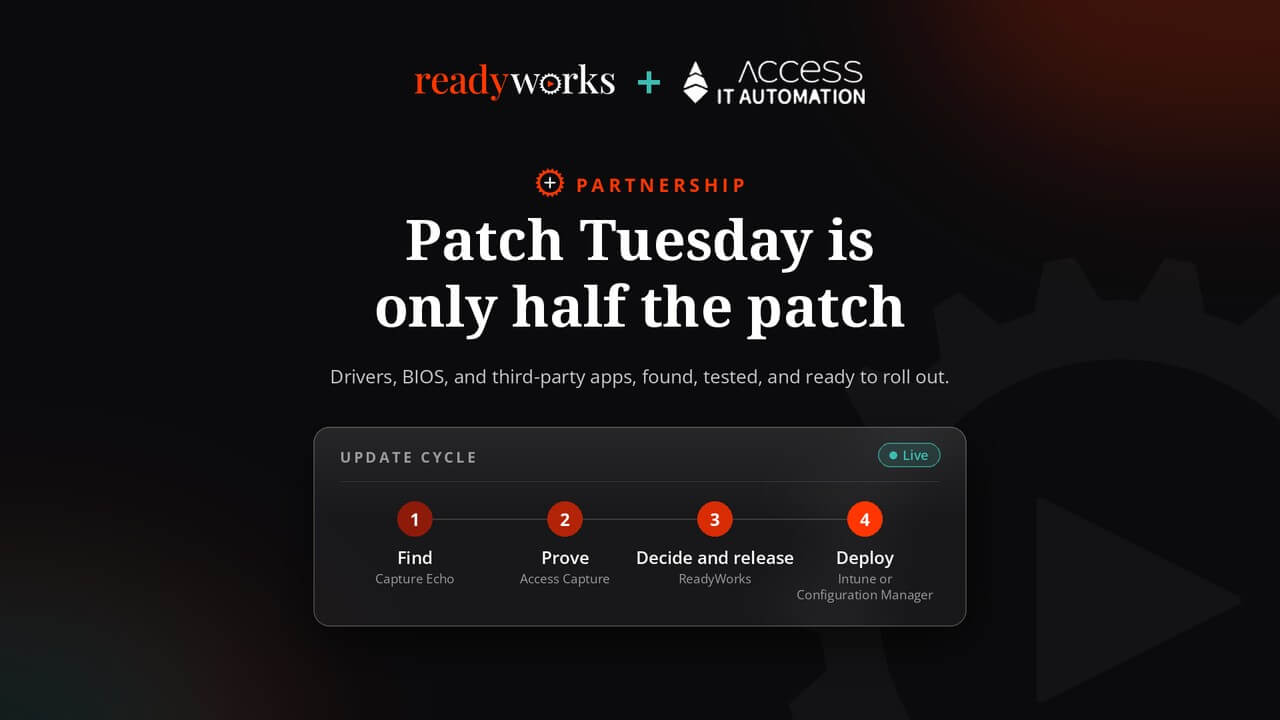
Patch Tuesday gets the attention, but a Windows device is only as current as its drivers, its BIOS and the dozens of applications running on it. Those updates arrive on each vendor’s schedule, not Microsoft’s, and in most enterprises someone still finds them by hand. Through our partnership with Access IT Automation, the whole cycle can now be automated. Capture Echo watches the drivers and applications you care about and picks up each new release. Access Capture packages and tests it. ReadyWorks connects the results to every device, decides which devices are ready, runs the rollout waves and records every step. Microsoft Intune, Configuration Manager or Windows Autopatch still do the deployment, as they should.
Why Is Patch Tuesday Only Half the Problem?
Microsoft’s own releases are getting bigger. It shipped more than 1,400 fixes in October 2026, and Microsoft has said AI tools are driving the increase and expects releases to keep growing. Deadlines are tightening too. When Microsoft fixed an exploited Windows Shell flaw on October 13, CISA gave federal agencies until October 16 to remediate it.
But Patch Tuesday is the predictable part. It arrives on the second Tuesday of the month with a published list. The rest of the device does not work that way:
- Drivers and BIOS are released per hardware model, by each OEM, whenever they are ready.
- Third-party applications such as browsers, PDF readers, collaboration tools and VPN clients each ship on their own cadence, often several times a month.
- Line-of-business applications depend on both, and are usually the first thing to break.
- Curate. Paste a vendor support URL to onboard a device model in about a minute. Subscribe at the level you need: a whole device, a driver category such as BIOS or audio, a single package or an individual file. Track applications from vendor sites, GitHub, GitLab, Winget or Chocolatey.
- Detect. Echo checks vendor sources around the clock. Each new release is retrieved and stored with checksums, version, release date and the vendor’s own priority rating.
- Deliver. New releases flow straight into Access Capture for packaging and testing. Notifications arrive as a single digest, grouped by subscription, with critical updates first.
Most teams find out about these updates by checking vendor websites, reading release-note emails or waiting for a scanner to flag a version that is already exposed. And the risk is real. The CrowdStrike incident that crashed an estimated 8.5 million Windows devices in 2024 was caused by a third-party update, not a Microsoft patch. The update that hurts you is just as likely to come from outside Patch Tuesday as from inside it.
Where Does the Time Actually Go?
Deployment is rarely the bottleneck. Intune and Configuration Manager can push an update to thousands of devices quickly. The time goes into three manual steps around it:
- Finding the update. Knowing a new version exists, getting the right file for the right model and confirming it is genuine.
- Proving it works. Packaging it and testing it against the applications employees rely on.
- Releasing it safely. Deciding which devices are ready, rolling out in waves, keeping employees informed and keeping a record an auditor will accept.
In many enterprises all three are still tracked in spreadsheets. Our partnership with Access IT Automation automates each one.
What Does Access IT Automation Do?
Access IT Automation is a specialist end user computing and application management company, part of the Access plc group. Its platform, Access Capture, is an API-first application lifecycle automation platform. It packages applications in legacy and modern formats, runs automated smoke, user acceptance and performance testing, and publishes tested packages for controlled release, including through Intune.
Its newest module, Capture Echo, now in early access, handles the first step: finding the update. Access IT Automation built it because its own packaging teams needed it. Echo is a curated watch list, not a download-everything repository:
In Access IT Automation’s words, Echo is the trigger and Capture is the engine. Echo is delivered as an Azure subscription through Microsoft Entra ID, so there is nothing to install.
“Patch Tuesday has a process in most organisations. Drivers and third-party apps usually have a spreadsheet. We built Capture Echo because our own packaging teams were tired of chasing versions, and with ReadyWorks those updates now get the same readiness, rollout and audit discipline as Windows itself.”
- David Butler-McAllister, COO, Access IT Automation
What Does ReadyWorks Add?
ReadyWorks connects to the tools you already run, including Intune, Configuration Manager and your CMDB, and keeps one continuously cleansed record of every device, user and application. With the Access Capture Connector, application packaging and testing run from within the ReadyWorks platform, and Access Capture reports back when an application has been tested and works. That result becomes a readiness check on every device that runs the application, or every device of the model a driver applies to.
From there, EndpointReady groups devices into waves, and surveys, attestations, self-service scheduling and timed communications keep employees informed and involved. If an update causes problems, EndpointReady includes automated rollback. ReadyAI analyzes the data and recommends next steps, and your team approves before anything changes. Every action is logged, explainable and covered by a tamper-evident audit trail.
“Every update has to reach your devices tested, with a clear answer on which devices are ready, whether it comes from Microsoft, a hardware vendor, or a software publisher. With Access Capture and Capture Echo connected to ReadyWorks, IT teams get that answer for every update, through one process, with every step on record.”
- Andrew Sweeney, CEO, ReadyWorks
Who Does What in an Automated Windows Update Cycle?
|
Step |
Who handles it |
What it does |
|
Find |
Capture Echo |
Watches subscribed drivers, BIOS, and applications. Retrieves and verifies each new release. |
|
Prove |
Access Capture |
Packages the update and runs automated smoke, user acceptance, and performance testing. |
|
Decide and release |
ReadyWorks |
Maps results to every affected device, and runs readiness checks, waves, employee communications, rollback, and the audit trail. |
|
Deploy |
Intune, Configuration Manager, or Windows Autopatch |
Installs the update on each approved wave. |
How Does an Update Cycle Run With Both?
There are now two ways into the same process: Microsoft’s monthly release, and any driver or application release that Echo detects in between.
- A trigger arrives: Microsoft publishes its monthly updates, or Capture Echo detects a new version of a driver, BIOS or application you subscribe to, retrieves it and verifies its checksum.
- Access Capture packages and tests: For a new driver or application version, Capture packages it. For a Windows update, Capture retests the affected applications. Automated testing runs in both cases.
- Results flow into ReadyWorks: Through the Access Capture Connector, each application or driver is marked ready only after it passes.
- EndpointReady builds the waves: It finds every device the update applies to, checks each against its readiness criteria and starts with a pilot group.
- Employees are notified and choose a time within the deadline: Your deployment tool installs the update on each wave.
- Exceptions are handled and recorded: Devices that fail get a documented exception, problem updates are rolled back, and every step is on record, from the vendor file’s checksum to the final install.
What Changes for Your Team?
- One process for every update: Microsoft, OEM and third-party updates follow the same path, instead of Patch Tuesday getting a process and everything else getting a spreadsheet.
- Drivers stop being nobody’s job: Driver and BIOS updates are tracked by model and released with the same readiness checks as applications.
- Your team approves instead of chasing: People spend their time on decisions and exceptions, not on checking vendor sites and building test lists.
- Evidence an auditor will accept: Source and checksum from Echo, test results from Capture, and approvals, waves and rollbacks from ReadyWorks, in one trail.
Each tool does the job it was built for. Microsoft’s tools deploy. Access IT Automation finds, packages and tests. ReadyWorks connects the data, runs the readiness and rollout work, and keeps the record. We have written about why Intune alone often isn’t enough for Windows servicing, and this partnership is how we close that gap, for Windows and for everything running on it.
This is not theory. ReadyWorks and Access IT Automation are about to start work together on a global Windows 11 migration covering VDI, applications and endpoints, with Access Capture integrated into ReadyWorks from day one.
Talk to Us Before the Next Patch Tuesday
Microsoft’s next release is on December 8. The vendor releases in between will not wait for it. If finding, testing and tracking updates still holds up your patch cycles, each new release adds to the backlog. Book 15 to 30 minutes with ReadyWorks and Access IT Automation this week, and we will walk through where Capture Echo, Access Capture and ReadyWorks fit in your process.
Talk to someone who has done this, or register now for Capture Echo early access. For the full set of practices, see our guide to Windows patch management best practices.
Frequently Asked Questions
Does Capture Echo or ReadyWorks replace Intune or Configuration Manager?
No. Your existing deployment tool still installs the updates. Capture Echo finds them, Access Capture packages and tests them, and ReadyWorks decides where and when they go and records the result.
Can Capture Echo be used without Access Capture?
Yes, for subscriptions and notifications. Automated packaging and testing of the releases Echo detects require an Access Capture license.
What can Capture Echo track?
Device drivers and BIOS by hardware model, and applications from vendor websites, GitHub, GitLab, Winget, and Chocolatey. You subscribe at device, driver category, package, or file level.
How do test results get into ReadyWorks?
Through the Access Capture Connector. When Access Capture confirms an application or driver works, ReadyWorks applies that result as a readiness check on every affected device.
About Access IT Automation
Access IT Automation is a specialist end user computing, digital employee experience and application management company, founded in 2017 as part of the Access plc group. Its Access Capture platform automates the application lifecycle, from detecting new releases with Capture Echo to packaging, testing and publishing, and integrates with ReadyWorks through the Access Capture Connector.